2021年8月2日星期一

Ialtest Link Truck Diagnostic Tool V12.2 Software Free Download


Ialtest link is a professional heavy duty truck diagnostic tool for multi brands, supports English and Spanish language. It can read fault codes, sensor data measurement, calibration features ECU, there are a lot of maintenance information and circuit diagrams, electrical schematics,etc.

Ialtest is a comprehensive device combines different popular diagnostic tools such as Man CAT T200, SD Connect C4, DAF VCI560, VOLVO VOCOM, Scania VCI2, IVECO E.A.S.Y ect. in one device.
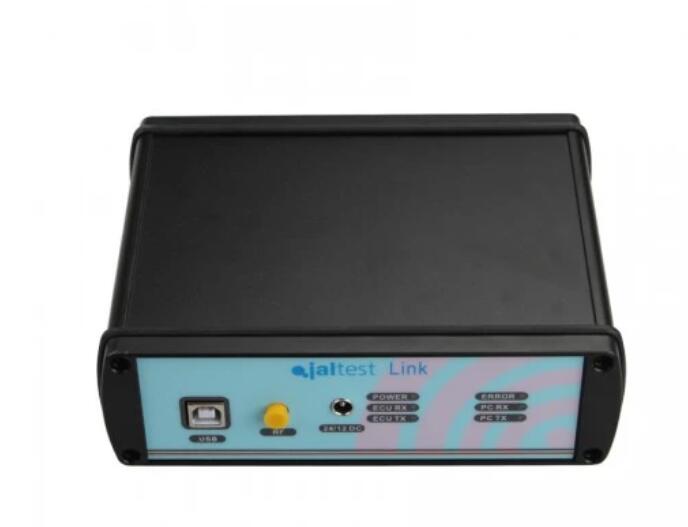
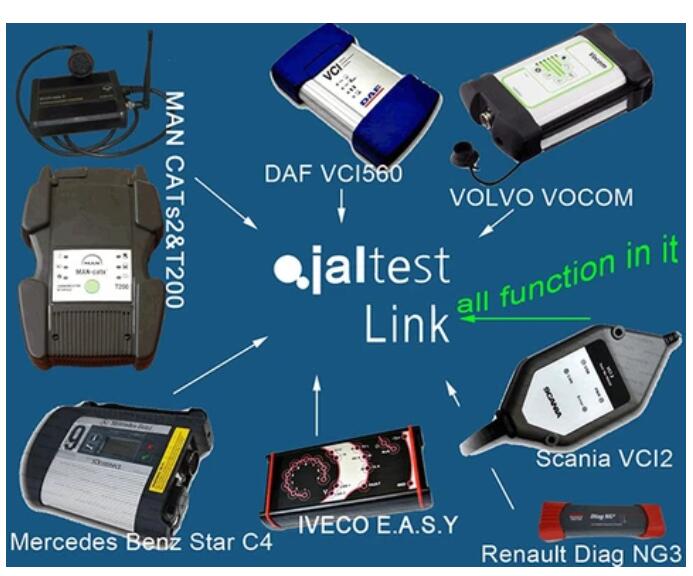
Ialtest-Link-truck-diagnostic-tool-1
Ialtest-Link-Truck-Diagnostic-Tool-2

Ialtest Link Truck Diagnostic Tool Description
1. JALsoftware has system electronic scheme, technical date, maintenance date, technical release,IALtest,
2. There are a lot of maintenance information and circuit diagrams, electrical schematics, maintenance help, and a very simple and convenient diagnostic tool.
3. It is not only an advanced feature of the Scanner can diagnostic trucks,  buses, construction vehicles,  light commercial vehicles, trailer, special vehicle, agricultural machinery and more manufacturers etc. to test a good diesel, diesel pump and natural gas engines, single pump, high pressure common rail pump, and injector.
Top Three Reasons To Get Ialtest Link
1. It is not only has a common diagnostic functions, as well as calibration, reset and parameterize advanced features.
2. It can be useful to test the pressure of common rail maintenance parameters
3. It is a good detector, he had read fault codes, sensor data measurement, calibration features ECU,and test units as
ZME,IMV,EFC/M-PROB,PVC valve, fuel measurement solenoid valves .
Ialtest Link Truck Diagnostick Tool Vehicle List
1. mercedes-benz
2. MAN Trucks BUS
3. DAF
4. VOLVO GROUP
5. IVECO
6. SCANIA
7. Renault
8. HINO AMERICAN
9. HYUNDAI LIGHT-COMMERCIAL VEHICLE
10. ISUZU
11. MITSUBISHI LIGHT-COMMERCIAL VEHICLE
12. TOYOTA LIGHT-COMMERCIAL VEHICLE
13. NISSAN LIGHT-COMMERCIAL VEHICLE
14. CITROEN LIGHT-COMMERCIAL VEHICLE
15. FIAT LIGHT-COMMERCIAL VEHICLE
16. LIGHT-COMMERCIAL VEHICLE
17. FRIEIGHTLINER
18. GM-CHEVROLET HEAVY-DUTY
19. INTERNATIONAL HEAVY-DUTY
20. KENWORTH
21. MACK
22. PETERBILT
23. STERLING
24. WESTERN STAR
25. DODGE
26. Others Vehicle
27. Vehicle ABS, EBS, transmission, suspension , Electronic module.( some Vehicle Need optional cable, or DIY a cable yourself )
ialtest-link-truck-diagnostic-tool-vehicle-list-vxdas
Ialtest Link Supported Protocols:

Protocol DB37 PIN protocol DB37 PIN
Power: 1PIN(DC) J1850 PWM+ 2PIN(I)
Ground: 19PIN(DC) J1850 PWM- 21PIN(J)
K Diag line: 15PIN(C) J1850 VPW 22PIN(K)
L Diag line: 16PIN(D)
CAN high 17PIN(E)
CAN low 18PIN(F)
SAE J1708 A 34PIN(G)
SAE J1708 B 35PIN(H)
Ialtest Link V12.2 Software Download Link

https://mega.nz/folder/Vb5QhbIA#6sAQGN4wYU0DpcV2l3bOxg

Enjoy!

2020年3月5日星期四

Test the Connection to the Vehicle using NEXIQ Device Tester

Test the Connection to the Vehicle
Use the Device Tester to test the connection between the USB-Link and the vehicle. At startup, the Device Tester checks for any NEXIQ drivers installed on the PC.
-Download NEXIQ Product Driver here: NEXIQ Driver
Access the Device Tester from the Windows task-bar
1. Prepare your PC, and connect Heavy Duty Truck Scanner NEXIQ device to Diagnostic Port/Connector on unit.
2. Click Start and then select All Programs – NEXIQ – Device Tester, or through shortcut “Device Tester” on desktop.
3. Use the drop-down button in the “Device” box to select the appropriate device (for example: USB-Link). The Device box lists all the devices supported by the NEXIQ drivers installed on the PC.
4. Use the drop-down button in the “Protocol” box to select the appropriate protocol (for example: J1708). The Protocol box lists only the protocols supported by the device selected in the “Device” box.
5. Press the “Start Test” button.
6. The “Device Tester” screen is refreshed, and data received from the vehicle bus is displayed in the “Bus Messages” window.

NOTE: The window in the lower portion of the screen displays a list of all systems seen on the bus. It is used for J1708 and J1939 only. For all other protocols this window will be unavailable (i.e., NOT USED). For J1708, the window title reads MIDs Seen. For J1939, the window title reads Source Addresses Seen.
Preparing to Use the USB-Link
7. If the Connection Indicator button is red (i.e., Not Connected), do one of the following:
—For wireless connection using Bluetooth technology:
? In the Device list, make sure that the heading is BT USB-Link (Protocol desired).
? Check to ensure that the connections between the USB-Link and the vehicle are secure (i.e., the Diagnostic Connector).
? Check to make certain that the Power LED on the USB-Link is illuminated.
? Check to make sure you are “paired” with devices.
—For wired connection using a USB cable:
? In the Device list, make sure that the heading is USB-Link (Protocol desired).
? Check to ensure that the connections between the USB-Link and PC are secure (i.e., the USB cable).
? Check the connections between the USB-Link and the vehicle (i.e., the Diagnostic Connector).
? Check to make certain that the Power LED on the USB-Link is illuminated.
8. Click “Stop Test” to end the test, or select another device to test

http://blog.obdii.shop/test-the-connection-to-the-vehicle-using-nexiq-device-tester/

2018年11月25日星期日

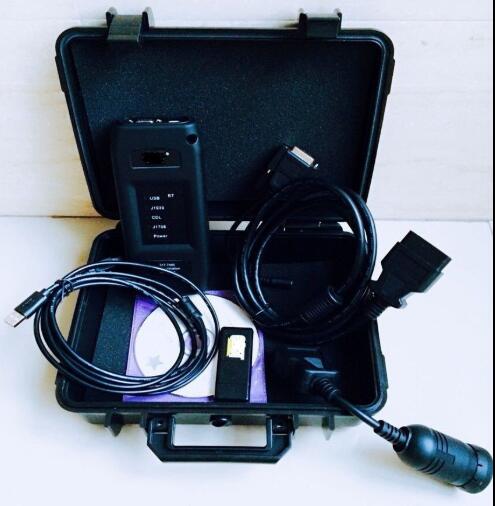
Newest CAT ET 3 Wireless Adapter truck diagnostic tool Communication With Wi-Fi

Newest CAT Caterpillar ET Wireless Adapter truck diagnostic tool
cat-et-1
Product Details
Item specifics
Item Width: 15cm
Model Name: ET 3 wifi
Item Length: 20cm
Software Version: ET 3 wifi
Brand Name: Arsmundi
Special Features: wifi
Hardware Version: ET 3 wifi
Item Height: 8cm
Voltage: V
Item Type: Car Diagnostic Cables and Connectors
Power: W
External Testing Certification: CE
Item Weight: 1kg
Electronic: No
Item Type: Code Readers & Scan Tools
Language: Denish,English,French,German,Italian,Polish,Spanish
elm327 interface length: 10 cm
weight: 2kg
Hardware Version: new
Package Size: 10cm x 10cm x 5cm (3.94in x 3.94in x 1.97in
Item Name: ET Adaper 3 With wifi
Warranty: 3 year
Product Description
cat-et-2 cat-et-3
Communication:
1. Allows communication between service tools and engine controls using various data links such as J1939/11, DeviceNet (future release), CAT DataLink, and J1708 (ATA) vehicle networks
2. Flash program allows adapter firmware upgrades as additional features become available
3. Uses J1939/11, high-speed data link (part of ADEM III controls), substantially reducing flash times
4. Automatically selects J1939/11 when flashing the engine (reduces the flash time approximately 80%, from 14 minutes to 3 minutes).
Heavy Duty Truck diagnostic Scanner Specification:
1.ECM Summary screen lists every control module on equipment
2.Being tested and gives information on these modules.
3.Fast hookup and real time display of systems status. Displays ,readings such as rpm, boost, pressures, temperatures, etc. for Easy troubleshooting.
4.Identifies faulty sensors, harness connectors, and system parameters which are out of specification. Allows customers
5.To help dealer identify problems without visiting machine.
6.Identifies intermittent sensors and wiring problems during Machine operation and keeps a record of each one. Showswhen problem occurred and how often it happened.
7.Added information to allow customer to assist dealer in diagnosing and repairing problems. (Troubeshooting Help is not built in with in the program, you will still need go back to books in order to follow a repair description and steps in each Fault Code display within the program).English and metric units of measure integrated help file to easy learn the “How To” around the software.
8.Operate System: windows XP/Windows7